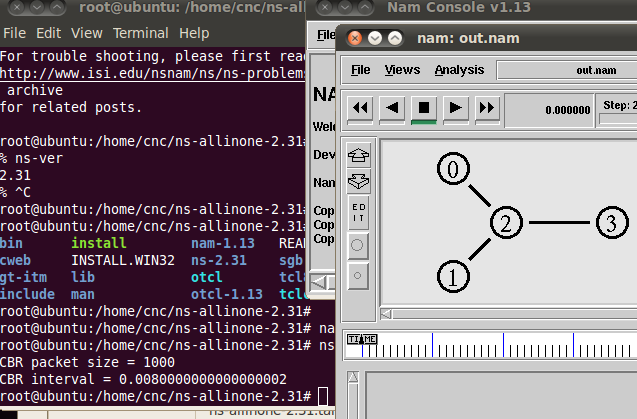
Network Simulator 2 Installation (NS2)
Ns is a discrete event simulator targeted at networking research. Ns provides substantial support for simulation of TCP, routing, and multicast protocols over wired and wireless (local and satellite) networks.[1]
You can download ns2 files from http://sourceforge.net/projects/nsnam/files/allinone/. In this documentation we use Ubuntu 10.04 32bit as operating system. You can download iso file from http://old-releases.ubuntu.com/releases/lucid/ubuntu-10.04-desktop-i386.iso
1. NS 2.35
- Root access
sudo su
- Re-synchronize the package index files from sources
apt-get update
- Extract the tar.gz file
tar -xvf ns-allinone-2.35.tar.gz
Note
Check the directory which ns-allinone-2.35.tar.gz downloaded
- Install packages
sudo apt-get install build-essential autoconf automake libxmu-dev

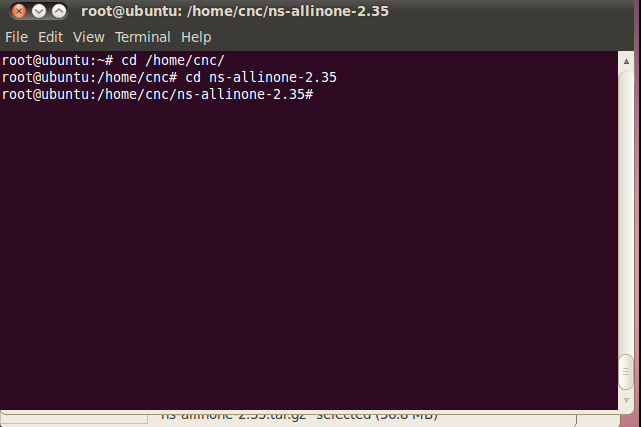
- Move to ns2 directory
cd /home/cnc/ns-allinone-2.35
Note
Check your own path, in this documentation we use /home/cnc/
- Install ns2
./install
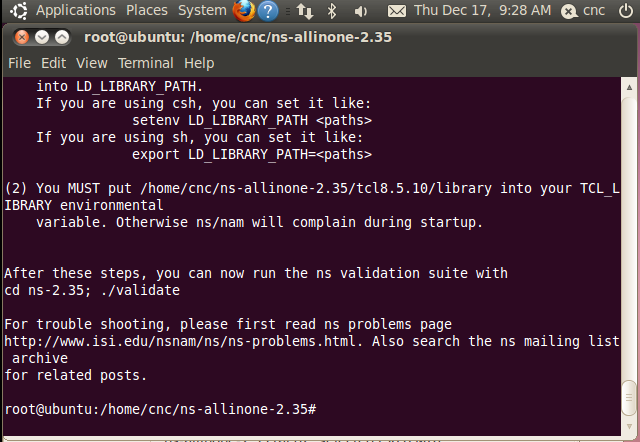
- When the installation succed it will be like this
- Edit bashrc
nano ~/.bashrc
- Add this to bashrc
# LD_LIBRARY_PATH
OTCL_LIB=/home/cnc/ns-allinone-2.35/otcl-1.14
NS2_LIB=/home/cnc/ns-allinone-2.35/lib
X11_LIB=/usr/X11R6/lib
USR_LOCAL_LIB=/usr/local/lib
export LD_LIBRARY_PATH=$LD_LIBRARY_PATH:$OTCL_LIB:$NS2_LIB:$X11_LIB:$USR_LOCAL_LIB
# TCL_LIBRARY
TCL_LIB=/home/cnc/ns-allinone-2.35/tcl8.5.10/library
USR_LIB=/usr/lib
export TCL_LIBRARY=$TCL_LIB:$USR_LIB
# PATH
XGRAPH=/home/cnc/ns-allinone-2.35/bin:/home/cnc/ns-allinone-2.35/tcl8.5.10/unix:/home/cnc/ns-allinone-2.35/tk8.5.10/unix
NS=/home/cnc/ns-allinone-2.35/ns-2.35/
NAM=/home/cnc/ns-allinone-2.35/nam-1.15/
PATH=$PATH:$XGRAPH:$NS:$NAM
- Source
source ~/.bashrc
- check ns-ver
ns

ns-ver

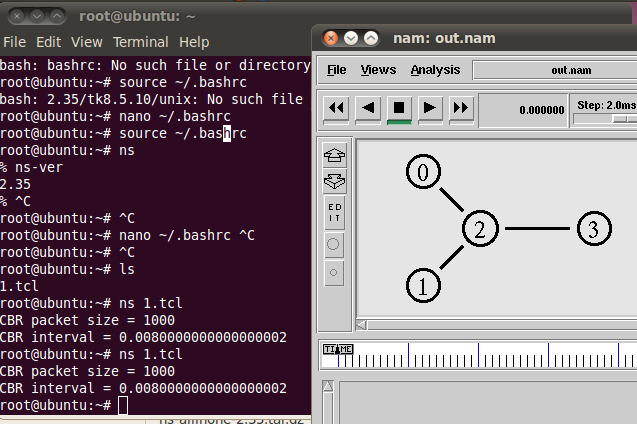
- Download and run simple script from http://nile.wpi.edu/NS/Example/ns-simple.tcl
ns ns-simple.tcl
2. NS 2.34
- Root access
sudo su
- Re-synchronize the package index files from sources
apt-get update
- Extract the tar.gz file
tar -xvf ns-allinone-2.34.tar.gz
Note
Check the directory which ns-allinone-2.34.tar.gz downloaded
- Install packages
sudo apt-get install build-essential autoconf automake libxmu-dev
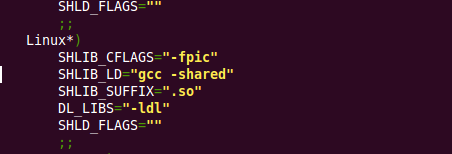
- Open file in otcl-1.13/configure
nano +6304 /home/cnc/ns-allinone-2.34/otcl-1.13/configure
- Replace SHLIB_LD=”ld -shared” into SHLIB_LD=”gcc -shared”
- Move to ns2 directory
cd /home/cnc/ns-allinone-2.34
Note
Check your own path, in this documentation we use /home/cnc/
- Install ns2
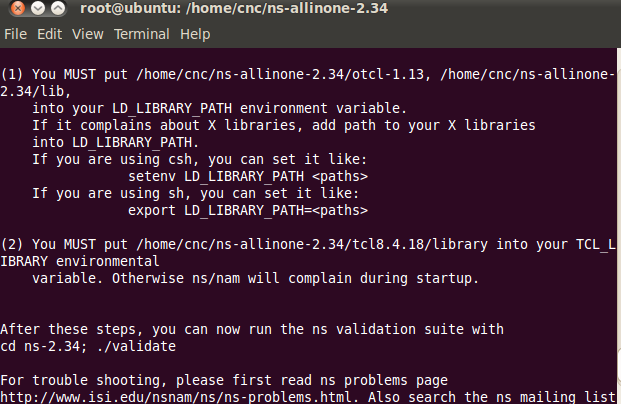
./install
- When the installation succed it will be like this
- Edit bashrc
nano ~/.bashrc
- Add this to bashrc
# LD_LIBRARY_PATH
OTCL_LIB=/home/cnc/ns-allinone-2.34/otcl-1.13
NS2_LIB=/home/cnc/ns-allinone-2.34/lib
X11_LIB=/usr/X11R6/lib
USR_LOCAL_LIB=/usr/local/lib
export LD_LIBRARY_PATH=$LD_LIBRARY_PATH:$OTCL_LIB:$NS2_LIB:$X11_LIB:$USR_LOCAL_LIB
# TCL_LIBRARY
TCL_LIB=/home/cnc/ns-allinone-2.34/tcl8.4.18/library
USR_LIB=/usr/lib
export TCL_LIBRARY=$TCL_LIB:$USR_LIB
# PATH
XGRAPH=/home/cnc/ns-allinone-2.34/bin:/home/cnc/ns-allinone-2.34/tcl8.4.18/unix:/home/cnc/ns-allinone-2.34/tk8.4.18/unix
NS=/home/cnc/ns-allinone-2.34/ns-2.34/
NAM=/home/cnc/ns-allinone-2.34/nam-1.14/
PATH=$PATH:$XGRAPH:$NS:$NAM
- Source
source ~/.bashrc
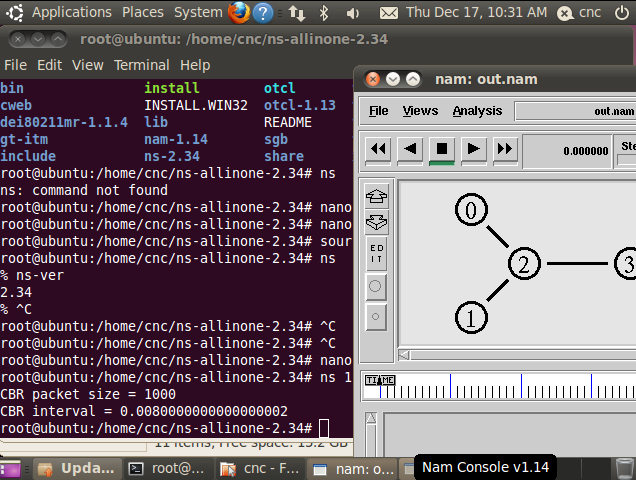
- check ns-ver
ns

ns-ver

- Download and run simple script from http://nile.wpi.edu/NS/Example/ns-simple.tcl
ns ns-simple.tcl
3. NS 2.33
- Root access
sudo su
- Re-synchronize the package index files from sources
apt-get update
- Extract the tar.gz file
tar -xvf ns-allinone-2.33.tar.gz
Note
Check the directory which ns-allinone-2.33.tar.gz downloaded
- Install packages
sudo apt-get install build-essential autoconf automake libxmu-dev
- Open file in otcl-1.13/configure
nano +5518 /home/cnc/ns-allinone-2.33/otcl-1.13/configure
- Replace SHLIB_LD=”ld -shared” into SHLIB_LD=”gcc -shared”
- Patch for NAM [2]
cd /home/cnc/ns-allinone-2.33/tk8.4.18
- Create a document
nano tk-8.4-lastevent.patch
- Patch for NAM from https://sources.gentoo.org/cgi-bin/viewvc.cgi/gentoo-x86/dev-lang/tk/files/tk-8.4-lastevent.patch?revision=1.1. Paste and save the code below to tk-8.4-lastevent.patch that we just created

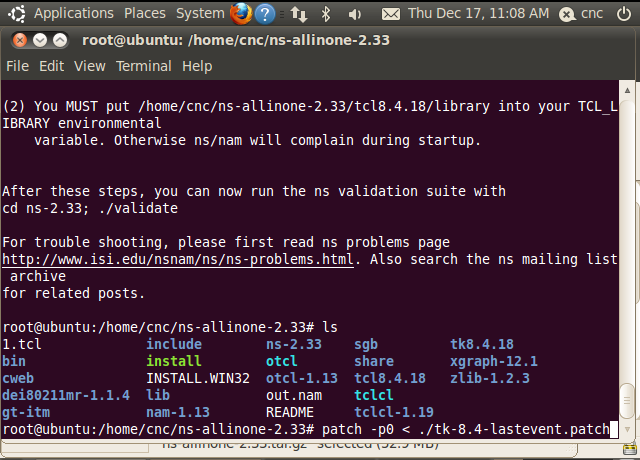
- To apply the patch
patch -p0 < ./tk-8.4-lastevent.patch
- Move to ns2 directory
cd /home/cnc/ns-allinone-2.33
Note
Check your own path, in this documentation we use /home/cnc/
- Install ns2
./install
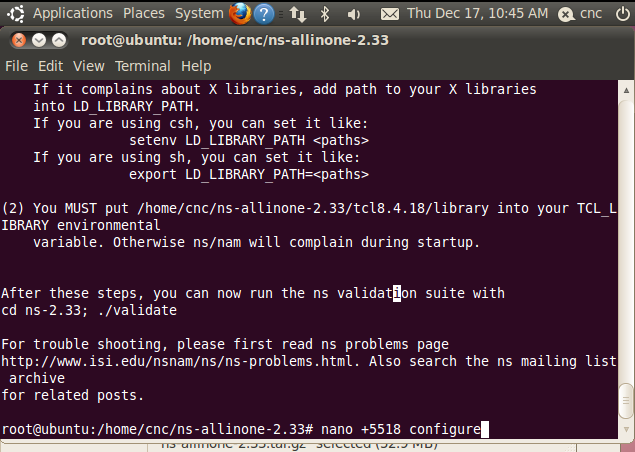
- When the installation succed it will be like this
- Edit bashrc
nano ~/.bashrc
- Add this to bashrc
# LD_LIBRARY_PATH
OTCL_LIB=/home/cnc/ns-allinone-2.33/otcl-1.13
NS2_LIB=/home/cnc/ns-allinone-2.33/lib
X11_LIB=/usr/X11R6/lib
USR_LOCAL_LIB=/usr/local/lib
export LD_LIBRARY_PATH=$LD_LIBRARY_PATH:$OTCL_LIB:$NS2_LIB:$X11_LIB:$USR_LOCAL_LIB
# TCL_LIBRARY
TCL_LIB=/home/cnc/ns-allinone-2.33/tcl8.4.18/library
USR_LIB=/usr/lib
export TCL_LIBRARY=$TCL_LIB:$USR_LIB
# PATH
XGRAPH=/home/cnc/ns-allinone-2.33/bin:/home/cnc/ns-allinone-2.33/tcl8.4.18/unix:/home/cnc/ns-allinone-2.33/tk8.4.18/unix
NS=/home/cnc/ns-allinone-2.33/ns-2.33/
NAM=/home/cnc/ns-allinone-2.33/nam-1.13/
PATH=$PATH:$XGRAPH:$NS:$NAM
- Source
source ~/.bashrc
- check ns-ver
ns

ns-ver

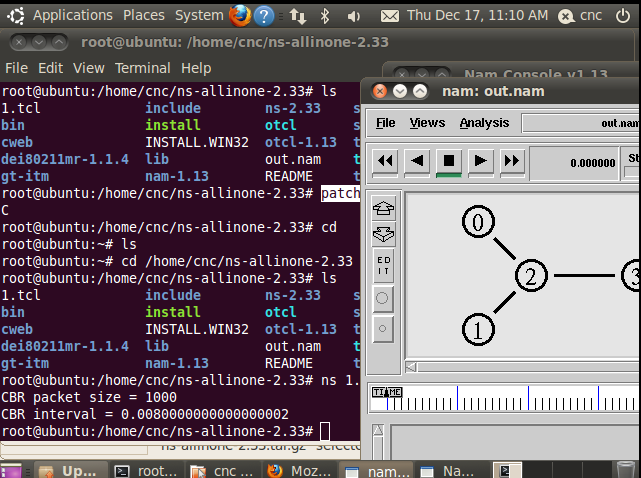
- Download and run simple script from http://nile.wpi.edu/NS/Example/ns-simple.tcl
ns ns-simple.tcl
4. NS 2.32
- Root access
sudo su
- Re-synchronize the package index files from sources
apt-get update
- Extract the tar.gz file
tar -xvf ns-allinone-2.32.tar.gz
Note
Check the directory which ns-allinone-2.32.tar.gz downloaded
- Install packages
sudo apt-get install build-essential autoconf automake libxmu-dev
- Open file in otcl-1.13/configure
nano +5516 /home/cnc/ns-allinone-2.32/otcl-1.13/configure
- Replace SHLIB_LD=”ld -shared” into SHLIB_LD=”gcc -shared”
- Patch for NAM [2]
cd /home/cnc/ns-allinone-2.32/tk8.4.15
- Create a document
nano tk-8.4-lastevent.patch
- Patch for NAM from https://sources.gentoo.org/cgi-bin/viewvc.cgi/gentoo-x86/dev-lang/tk/files/tk-8.4-lastevent.patch?revision=1.1. Paste and save the code below to tk-8.4-lastevent.patch that we just created

- To apply the patch
patch -p0 < ./tk-8.4-lastevent.patch

Note
Check your own path, in this documentation we use /home/cnc/
- Move to ns2 directory
cd /home/cnc/ns-allinone-2.32
- Install ns2
./install
- When the installation succed it will be like this

- Edit bashrc
nano ~/.bashrc
- Add this to bashrc
# LD_LIBRARY_PATH
OTCL_LIB=/home/cnc/ns-allinone-2.32/otcl-1.13
NS2_LIB=/home/cnc/ns-allinone-2.32/lib
X11_LIB=/usr/X11R6/lib
USR_LOCAL_LIB=/usr/local/lib
export LD_LIBRARY_PATH=$LD_LIBRARY_PATH:$OTCL_LIB:$NS2_LIB:$X11_LIB:$USR_LOCAL_LIB
# TCL_LIBRARY
TCL_LIB=/home/cnc/ns-allinone-2.32/tcl8.4.15/library
USR_LIB=/usr/lib
export TCL_LIBRARY=$TCL_LIB:$USR_LIB
# PATH
XGRAPH=/home/cnc/ns-allinone-2.32/bin:/home/cnc/ns-allinone-2.32/tcl8.4.15/unix:/home/cnc/ns-allinone-2.32/tk8.4.15/unix
NS=/home/cnc/ns-allinone-2.32/ns-2.32/
NAM=/home/cnc/ns-allinone-2.32/nam-1.13/
PATH=$PATH:$XGRAPH:$NS:$NAM
- Source
source ~/.bashrc
- check ns-ver
ns

ns-ver

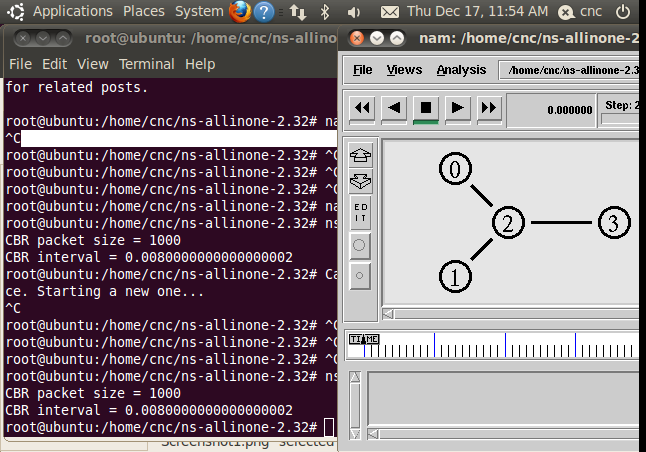
- Download and run simple script from http://nile.wpi.edu/NS/Example/ns-simple.tcl
ns ns-simple.tcl
5. NS 2.31
- Root access
sudo su
- Re-synchronize the package index files from sources
apt-get update
- Extract the tar.gz file
tar -xvf ns-allinone-2.31.tar.gz
Note
Check the directory which ns-allinone-2.31.tar.gz downloaded
- Install packages
sudo apt-get install build-essential autoconf automake libxmu-dev
- Open file in otcl-1.13/configure
nano +5516 /home/cnc/ns-allinone-2.31/otcl-1.13/configure
- Replace SHLIB_LD=”ld -shared” into SHLIB_LD=”gcc -shared”
- Patch for NAM [2]
cd /home/cnc/ns-allinone-2.31/tk8.4.14
- Create a document
nano tk-8.4-lastevent.patch
- Patch for NAM from https://sources.gentoo.org/cgi-bin/viewvc.cgi/gentoo-x86/dev-lang/tk/files/tk-8.4-lastevent.patch?revision=1.1. Paste and save the code below to tk-8.4-lastevent.patch that we just created
- To apply the patch
patch -p0 < ./tk-8.4-lastevent.patch
- Move to ns2 directory
cd /home/cnc/ns-allinone-2.31
Note
Check your own path, in this documentation we use /home/cnc/
- Install ns2
./install
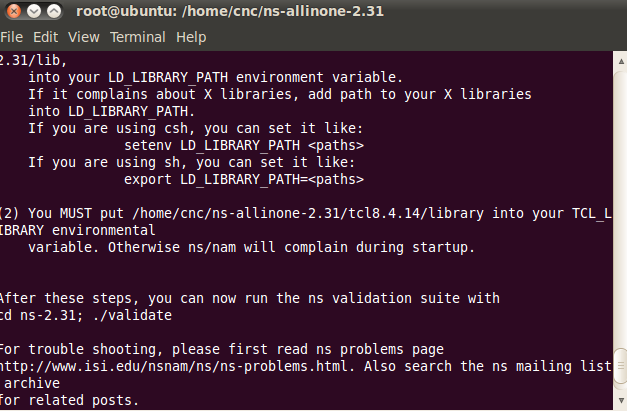
- When the installation succed it will be like this
- Edit bashrc
nano ~/.bashrc
- Add this to bashrc
# LD_LIBRARY_PATH
OTCL_LIB=/home/cnc/ns-allinone-2.31/otcl-1.13
NS2_LIB=/home/cnc/ns-allinone-2.31/lib
X11_LIB=/usr/X11R6/lib
USR_LOCAL_LIB=/usr/local/lib
export LD_LIBRARY_PATH=$LD_LIBRARY_PATH:$OTCL_LIB:$NS2_LIB:$X11_LIB:$USR_LOCAL_LIB
# TCL_LIBRARY
TCL_LIB=/home/cnc/ns-allinone-2.31/tcl8.4.14/library
USR_LIB=/usr/lib
export TCL_LIBRARY=$TCL_LIB:$USR_LIB
# PATH
XGRAPH=/home/cnc/ns-allinone-2.31/bin:/home/cnc/ns-allinone-2.31/tcl8.4.14/unix:/home/cnc/ns-allinone-2.31/tk8.4.14/unix
NS=/home/cnc/ns-allinone-2.31/ns-2.31/
NAM=/home/cnc/ns-allinone-2.31/nam-1.13/
PATH=$PATH:$XGRAPH:$NS:$NAM
- Source
source ~/.bashrc
- check ns-ver
ns

ns-ver

- Download and run simple script from http://nile.wpi.edu/NS/Example/ns-simple.tcl
ns ns-simple.tcl